New scheme of utility grades
JiShop 5.0 takes a fresh approach to the characters from the official "Jinmei-yo: kanji" list
("Kanji for personal names"). Earlier versions of JiShop dealt with the previous standard of this list, the last
modification of which was set in 1990, containing 284 kanji. In earlier versions of JiShop, three grades were
provided for these characters: (1) kanji used in both words and names, (2) kanji widely used in names and
(3) kanji rarely used in names.
In 2004, the Ministry of Education extended the "Jinmei-yo: kanji" list to 983 characters; this list included
many kanji never used in names. The current list should be considered as an expansion of the "Jo:yo: kanji"
list rather than a name list. JiShop 5.0 no longer provides special grades for the "Jinmei-yo: kanji";
instead it introduces 5 new grades to index the utility of characters outside the "Jo:yo: kanji" list.
Altogether, JiShop categorizes kanji characters into 22 grades of utility. The first 10 grades remain unchanged,
corresponding to the "Jo:yo: kanji" list; the other 12 grades correspond to characters outside the list.
In JISHOP 5.0, all the characters were redistributed between the groups according to the new scheme.
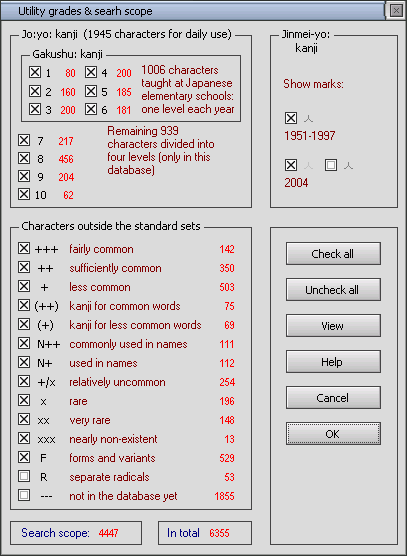
Information about the "Jinmei-yo: kanji" list is shown in dictionary entries on the right
hand of the utility index as an extra mark  . The mark looks like a "person"
kanji (first character in the word "Jinmei"). Place the cursor over the mark to see the year the character
was included in the list (1951, 1976, 1981, 1990, 1997, 2004). Open "Utility grades" window to change the
default settings for this mark. The check boxes allow you to show or hide this mark, or to highlight kanji
included on 2004 list by a pale grey mark.
. The mark looks like a "person"
kanji (first character in the word "Jinmei"). Place the cursor over the mark to see the year the character
was included in the list (1951, 1976, 1981, 1990, 1997, 2004). Open "Utility grades" window to change the
default settings for this mark. The check boxes allow you to show or hide this mark, or to highlight kanji
included on 2004 list by a pale grey mark.
The grade F (forms and variants) now has additional internal graduation, reflecting the utility of the
original characters for forms and variants. This graduation is invisible to the user, but is used for
kanji search and output of search results. For example, if the group F is included into the search scope
but groups of rare kanji (x, xx, xxx) are not included, the search results will not contain forms and
variants of rare kanji.
New features in kanji drill
- Slideshow mode
- "Hide" button for temporary removal of a kanji from the drill scope
- Marking characters as easy or difficult from the drill window
- On+Kun (extra item in "Guess" box)
- Adjustable colors of the data
- Full-screen mode
Setting kanji font 24x24
In the previous versions, the kanji in the windows of search results, unfolded lists, drill groups and search for kanji compounds were always drawn in the same font (MS Mincho in the case of true type) and always in black. Now you can change these parameters in a special section of "Fonts and colors 2" window.

Setting antialias
Antialiasing (smoothing) of dictionary data in the first versions of JiShop depended on the settings of the operating system, and often spoiled the picture quality. In version 4.0 it was blocked as unwanted everywhere apart from the magnification window and kanji drill. Now, you can set the desired level of antialias (from 0 to 4) in the "View" menu: separately for English fonts, kanji 48x48 (the main kanji image in a dictionary entry), kanji/kana 2x24 (search results, unfolded list, search for kanji compounds, phonetic dictionary, drill groups) and kanji/kana 16x16 (dictionary data in the entries). Choose 0 to switch off antialias; choose 4 for antialias of the highest quality. Of course, kanji and kana can only be smoothed when they are drawn in true type fonts, not bitmaps (this setting is now added to "View" menu as well). By default, antialiasing is used for kanji 48x48 and 24x24.
Adjusting left windows width
Use this new option in "View" menu to change the width of all JiShop windows on the left-hand side (search results, dictionary entry, unfolded list, kanji drill, etc.). The width is measured in the number of kanji (9-14) viewed in the "Search results" window. When you switch to full screen mode or large screen layout and back to the normal mode/layout, the width returns to its default setting.
Instant search
Set "Instant search" option in the Search menu to start the search immediately after a radical is selected or deselected, without clicking on P button.
Kokuji search
To search for kokuji (characters invented in Japan, usually without "on" reading), type "kokuji" in "Reading" box.
Search outside the search scope
In the window "Utility grades and search scope", a checkbox "If no kanji are found, search outside the scope" is added.
Web-search options
Right-clicking on a word in the phonetic dictionary opens a popup menu giving the user three options of searching for the word on the WWW:
- Search in Japanese-Japanese online dictionary dic.yahoo.co.jp.
- Search in Japanese Wikipedia. This can be very helpful, as Wikipedia articles often contain links to the respective articles in other language sections, so it is possible to read a detailed English explanation of a Japanese word in just two mouse clicks.
- Search through Japanese-language sites via Yahoo! Japan search engine.
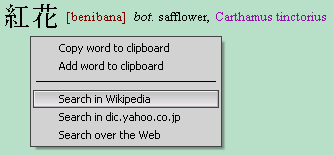
Web-search options are also provided for single characters. They are available in the popup menu of a dictionary entry.
New organization of file storage
From version 5.0, JiShop stores its files in a different format, which is better suited to the modern ideology of Windows and guarantees correct functioning under Windows Vista. By default, all files created by the program (database jishop.db and user's settings KDSettings.txt and KDFonts.txt) are saved not in the same folder as previously, but in Documents And Settings\{User name}\Application Data\Jishop. In this folder, a subfolder ‘Groups’ is created as well, which by default keeps the files of drill groups (samples.kdg and all user-created ones).
During the installation, you can choose the old scheme if you like it better.
Other improvements
- JiShop is fully integrated with Strokes (add-on software that displays
stroke-order diagrams). Now it is not necessary to install Strokes separately, as it is contained in
JiShop. Run it from "Entry" menu or hit shortcut key O ("Order").
- Dictionary entry and some other windows stay where the user has moved them and do not
move back to their default positions. To restore the default positions of all JISHOP
windows, a new command "Align all windows" is added to "View" menu.
- The option of automatically closing the unsuccessful search windows is now
provided.
- The option "If no kanji are found, search outside the scope" is provided in the
"Utility grades and search scope" window.
- The program can now be run on screens with low resolution (Asus EEE PC, etc.).
- A sequence of kana characters pasted from the clipboard now appears in the Reading box
(in previous versions it was ignored).
- An icon has been designed for drill group files (*.kdg).
- A lot of bugs have been fixed (especially in "Drill groups" window).
- The visual appearance of dictionary data in special modes (full screen, large screen, large system fonts, etc.) has been greatly improved.
Automatic check of updates
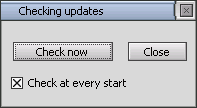
The dictionary data for JiShop is regularly updated. By default, the program checks at every start if there is a new data update or version upgrade on JiShop web-page (only if there is an active internet connection). You can switch off the default automatic check and do it manually via the command in "Options" menu.
Viewing fresh data
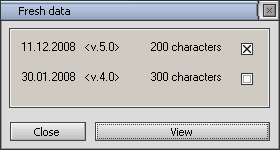
After updating dictionary data, use the "Options" menu to view the unfolded list of newly edited kanji.
New dictionary data
Since 30.01.2008, 200 kanji entries have been edited, and 6000 compound/katakana words have been added to the phonetic dictionary.
In version 5.1:
- The graphic structure has been revised for 168 kanji whose bitmaps differed from their
true type font glyphs (see the full list). From version 5.1, the true type font glyphs are considered JiShop standard. Bitmaps 48x48 and 24x24 pixels are redrawn.
The database and Radical Info are modified. Many of the rejected graphic structures stay in the database
as non-standard.
- Radical
 has been added to the 9th column of the radical menu. Now the menu contains 632 radicals. Radical
  (9th column) has been replaced by
  (5th column).
 - Search by fragments of readings has been improved. A special filter provides that your
dotted templates are applied only to single words, not to groups of adjacent words, as often happened before.
For example, if your template is ".i.i.i.i.i.", you will find just two kanji with kun readings
"ichijirushii" and "niginigishii" (in earlier versions, you would be given more than 300).
Another improvement is that templates like "...ha..." and "...su..." don't give you search
results like "...sha...", "...cha..." or "...tsu..." any more.
- Drill groups can be exported to text files. Three types of format are provided
for such files (see Drill Groups window menu).
- To place the kanji you have found (if you have found only one)
directly into the compound words search window without opening the dictionary entry,
press Shift when you click on the search button. To place it directly into the drill groups window, press Alt.
- Many other small improvements have been done and many bugs fixed.
- New dictionary data: 200 kanji entries have been edited, and 1000 compound words have been added to the phonetic dictionary.
In version 5.2:
- The program is modified to provide its correct functioning under Windows 7.
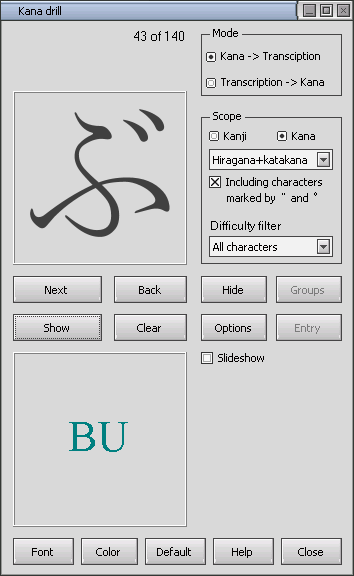
- Kana drill is provided. Check "Kana" box in the kanji drill window to turn it into the kana drill:
In version 5.3:
- Some small improvements have been done and many bugs fixed.
- New dictionary data: 100 kanji entries have been edited, and 2000 compound words have been added to the phonetic dictionary.
See also new features in version 6.0